

 עברית
 Русский
 English
Calls all day: "Is my phone ready?"
On every repair status change the customer gets a WhatsApp message in their language. They learn the phone is ready from the message, not by calling the store.
CRMOnline with the ready-made "Phone store and repair lab" setup: a phone-mode POS with IMEI tracking, repair tickets with passcode and lock pattern, WhatsApp repair updates for the customer, stock and Israeli tax documents.
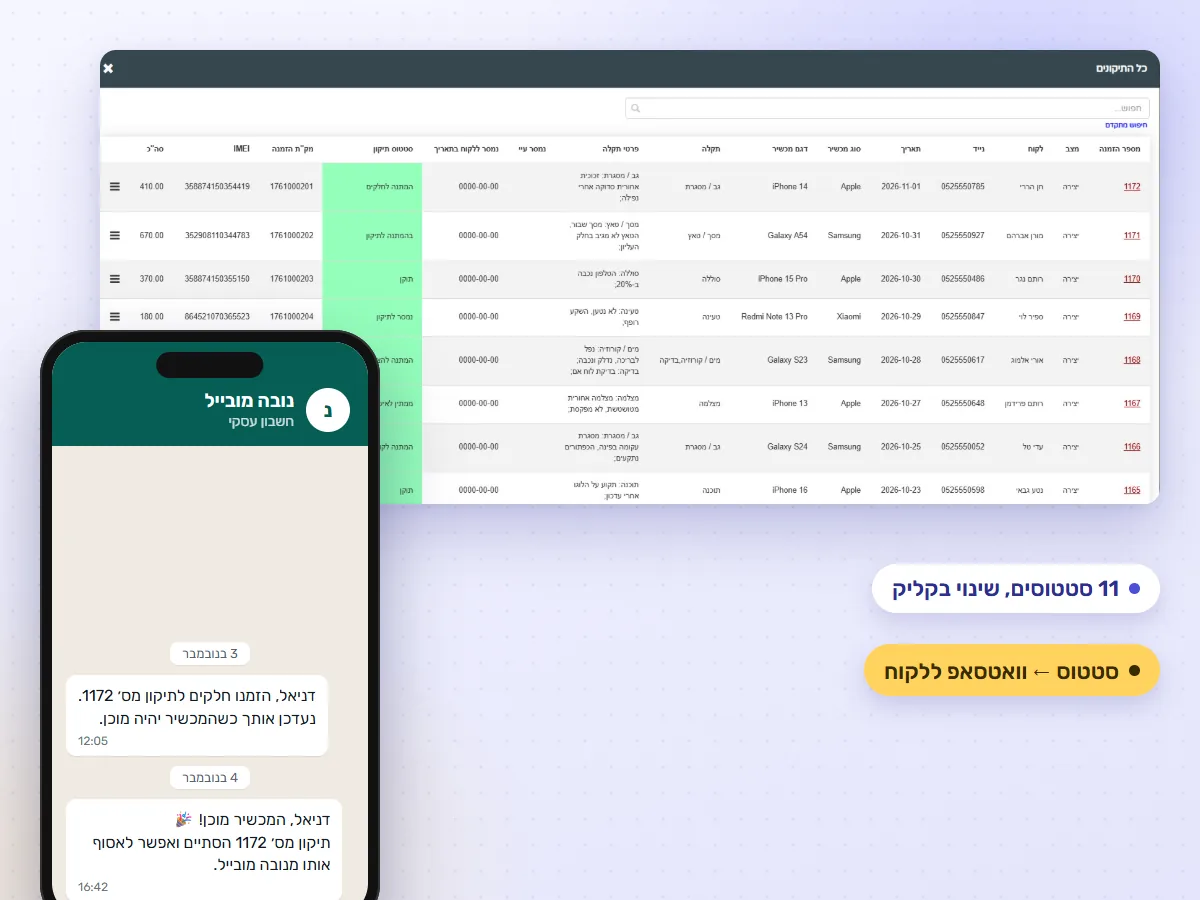
Five situations from an ordinary day in a store with a repair lab, and what changes with CRMOnline.
On every repair status change the customer gets a WhatsApp message in their language. They learn the phone is ready from the message, not by calling the store.
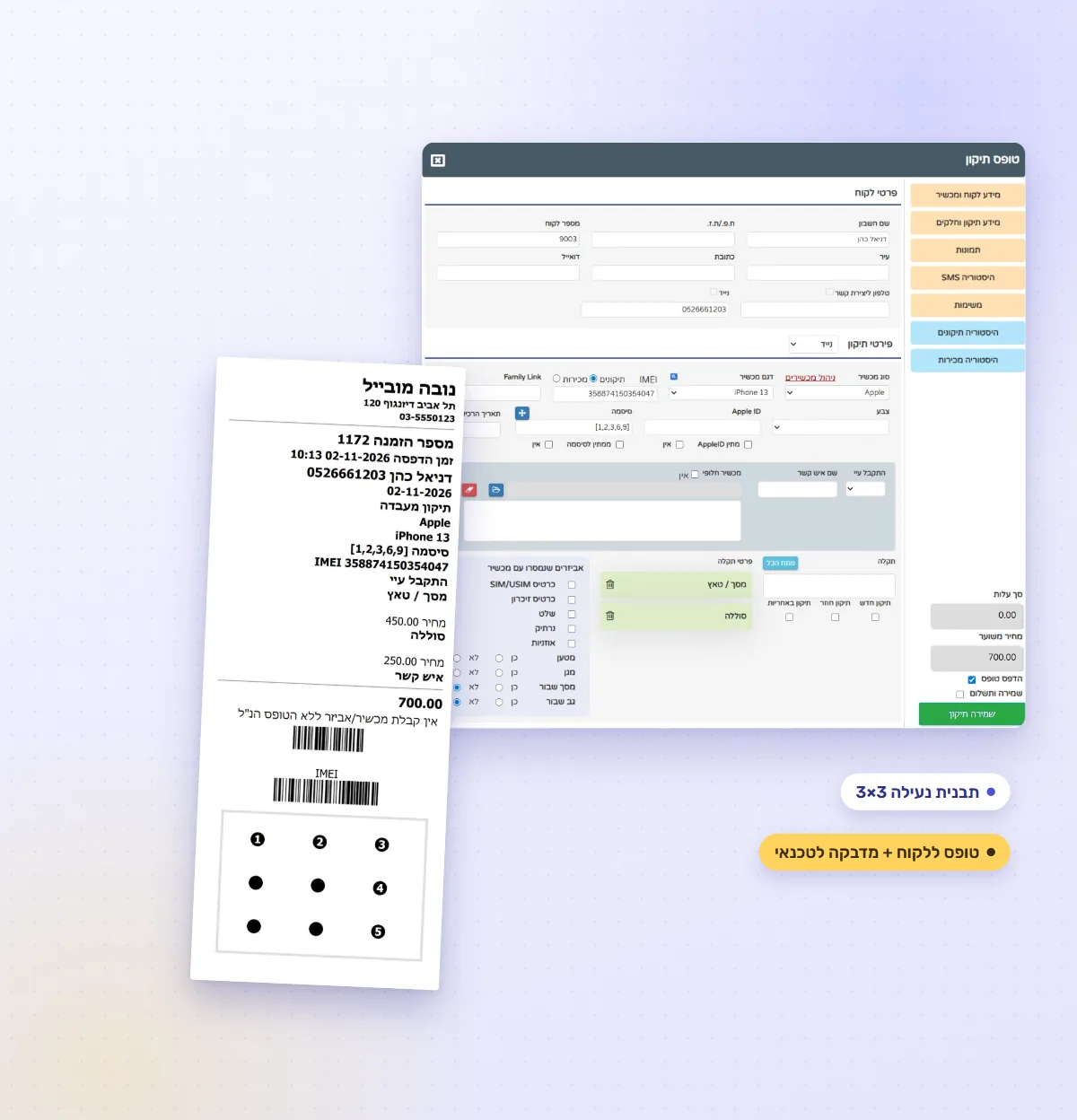
The repair ticket has IMEI, lock code, a lock pattern drawn on a 3×3 grid and Apple ID. The technician gets a label with the passcode, IMEI and repair barcode.
At intake you tick what came with the phone and whether the screen or back glass is cracked, and add photos. All of it is printed on the customer's receipt.
The receipt is found by the customer's phone number or name. For gifts the POS prints an exchange slip without prices, with an expiry date and barcode.
The "Shop employee" role cannot change prices, process returns or adjust stock at the POS. Selling below the minimum price needs a permission.
The salesperson and technician take four actions. Printing, customer messages and writing parts off stock are handled by the system.
The repair ticket opens straight from the POS. If the customer has repaired with you before, their history opens on its own. The IMEI fills in model, colour and purchase date. Faults are picked from a list and the total is calculated.
Saving prints a receipt for the customer and a label for the technician with passcode and barcode. The customer gets a WhatsApp message with the repair number.
The technician changes the status in one click right in the repairs list. On "need code", "awaiting approval", "waiting for parts" and "fixed" the customer gets a matching message.
The repair is paid at the POS, the deposit is deducted automatically and parts are written off stock. After pickup the customer gets a thank-you and a Google review link.
The POS in phone mode: product tiles, barcode scanner and IMEI search. Whatever is sold leaves stock immediately.
When you pick a phone, the POS lists the available IMEIs with colour. The chosen IMEI goes on the receipt and cannot be sold again. The POS suggests a case and screen protector for the phone.
Cash with change, card via terminal, instalments, Bit, PayBox, cheque, bank transfer, gift card. Payment can be split across several methods. The receipt is printed or sent to the customer by WhatsApp or SMS.
Find the receipt by phone number, name, invoice number or barcode. The old and new item are swapped in one operation and the IMEI returns to stock. If the new item costs more, the POS asks for the difference.
"Save deal" parks the basket and frees the POS for the next customer. A deposit on a repair or order is deducted automatically at pickup.
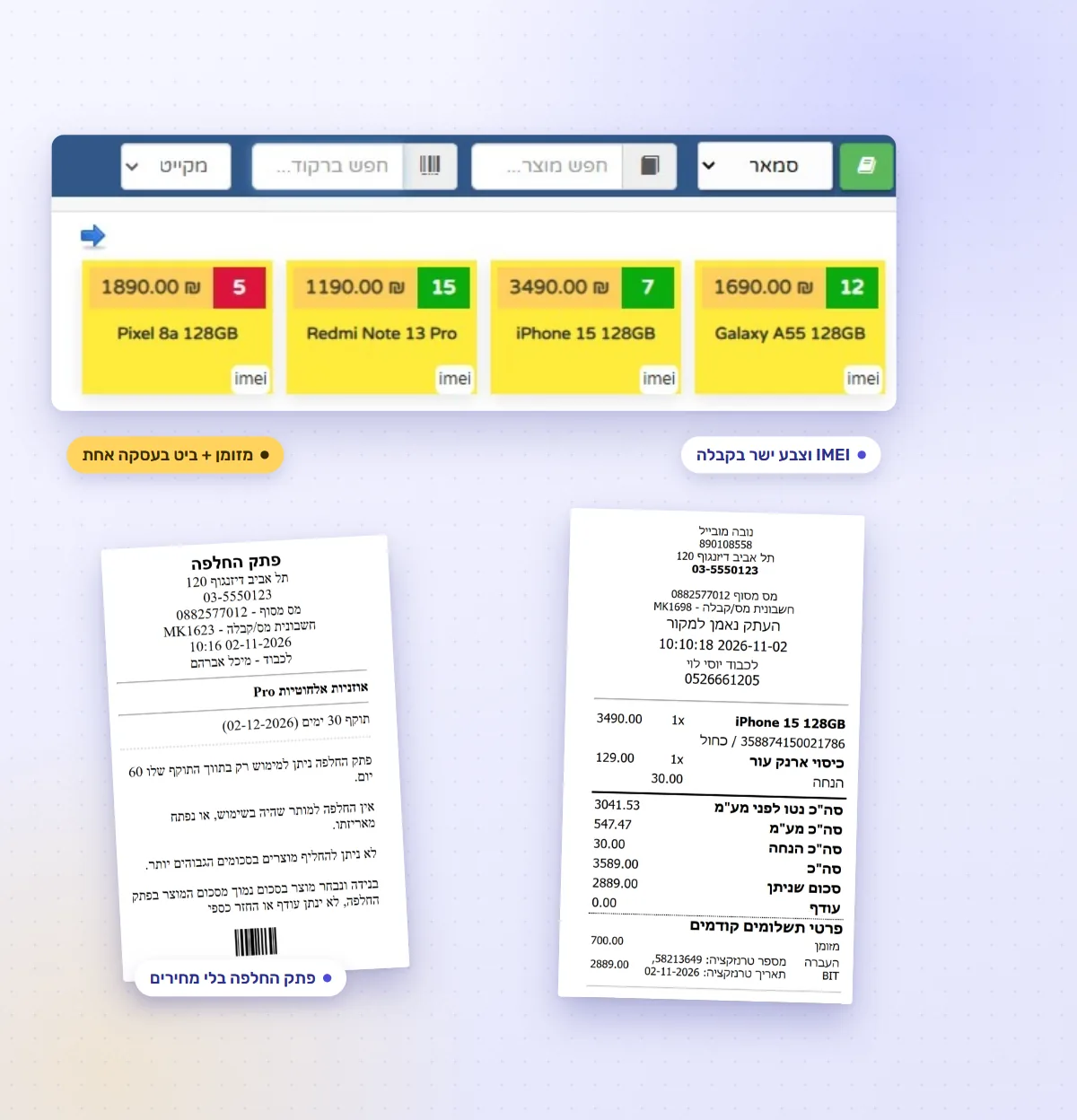
Everything is recorded at intake and printed on the customer receipt and the technician label.
The pattern is drawn on a 3×3 grid and printed on the technician label. There are Apple ID and Family Link fields and "waiting for code" and "waiting for Apple ID" flags. The owner chooses the required fields, for example Apple ID for iPhones.
SIM, memory card, case, charger, earphones, screen protector. "Cracked screen" and "cracked back" marks and several device photos. All of it appears on the customer's receipt.
Faults are picked from a list, each with its own price. Parts are taken from stock with quantity and cost shown, and written off when the repair is closed.
Loaner phones are kept in their own category, each with its own IMEI. A "loaner not returned" filter and an SMS reminder to the customer.
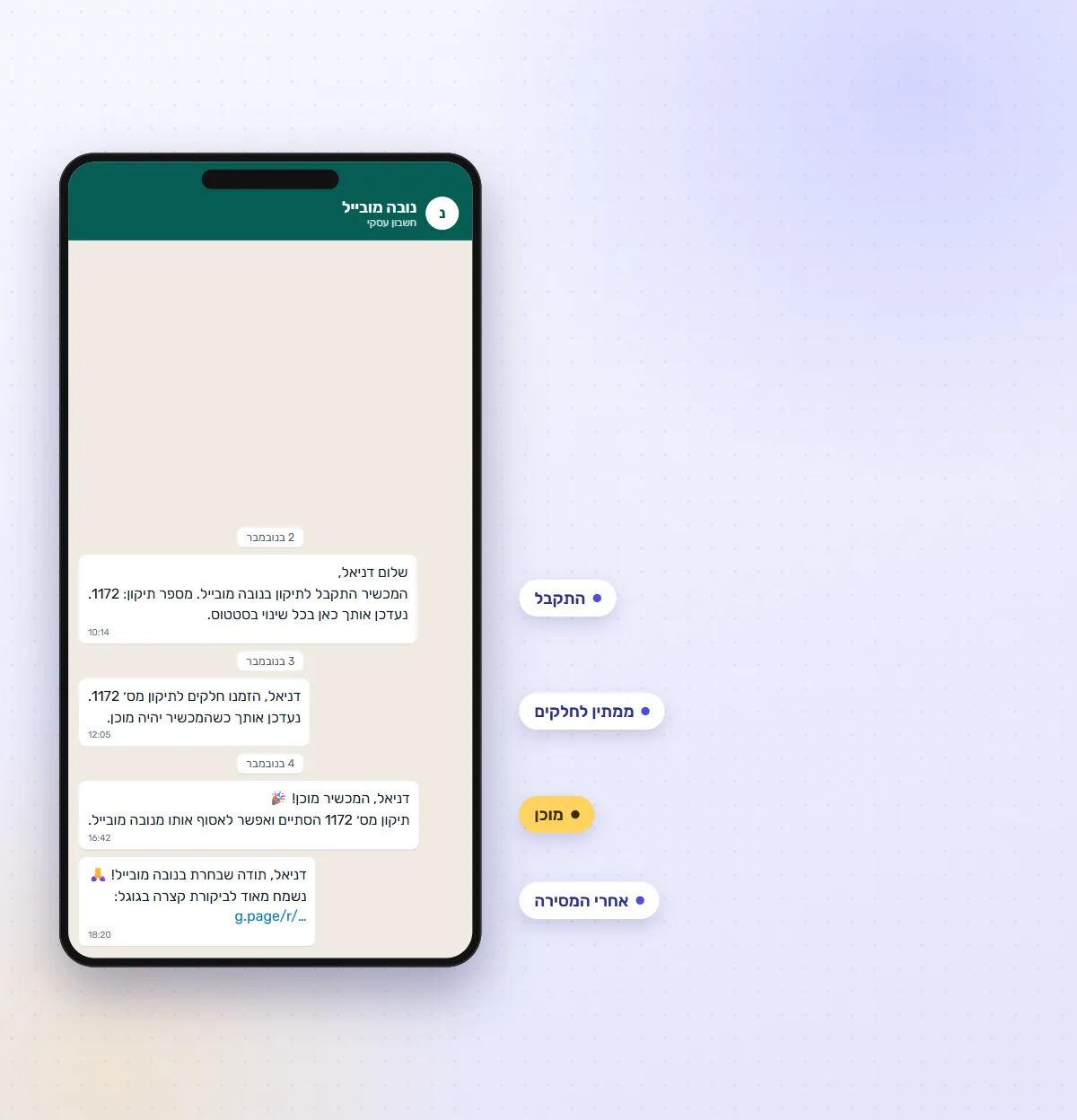
Messages go out by repair status, in Hebrew or Russian, and never during quiet hours. The store edits the wording itself.
Right after intake the customer gets the repair number and a promise of updates on every status change.
Need lock code, need Apple ID, preparing a quote, awaiting your approval, waiting for parts, ready, cannot be repaired. The customer can reply in the same chat.
If the device is not collected within 3 working days, the customer gets a reminder at 10:00. After 4 more working days the responsible employee gets a task to call.
When the repair is closed with the "returned to customer" status, the customer gets a thank-you and a link to review the store on Google.
The setup includes 11 repair statuses, message automations, 20 product categories, ready repair services, roles and a dashboard.
The automations are built in the visual automation builder. You can add your own, for example a birthday greeting or a payment link.
Repair received
WhatsApp to the customer with the repair number, in their language
Status "waiting for parts"
The system offers to send the supplier an SMS with the parts list
Repair paid at the POS
Status "fixed", repair and pickup dates filled in
Status "returned to customer"
Thank-you and a Google review link
Ready but not collected
Reminder to the customer at 10:00
Still not collected
Task for the responsible employee: "call the customer"
Internal statuses ("in repair queue", "sent for repair", "disabled") send nothing to the customer.
| Status | What the customer gets |
|---|---|
| Waiting for lock code | a request to send the code |
| Apple ID change | a request for Apple ID or to unlink the device |
| Waiting for quote | "checked, preparing a quote" |
| Awaiting approval | "the quote awaits your approval" |
| Waiting for parts | "parts have been ordered" |
| Fixed | "the device is ready for pickup" |
| Cannot be repaired | "cannot be repaired, ready for pickup" |
| Returned to customer | a thank-you and a review link |
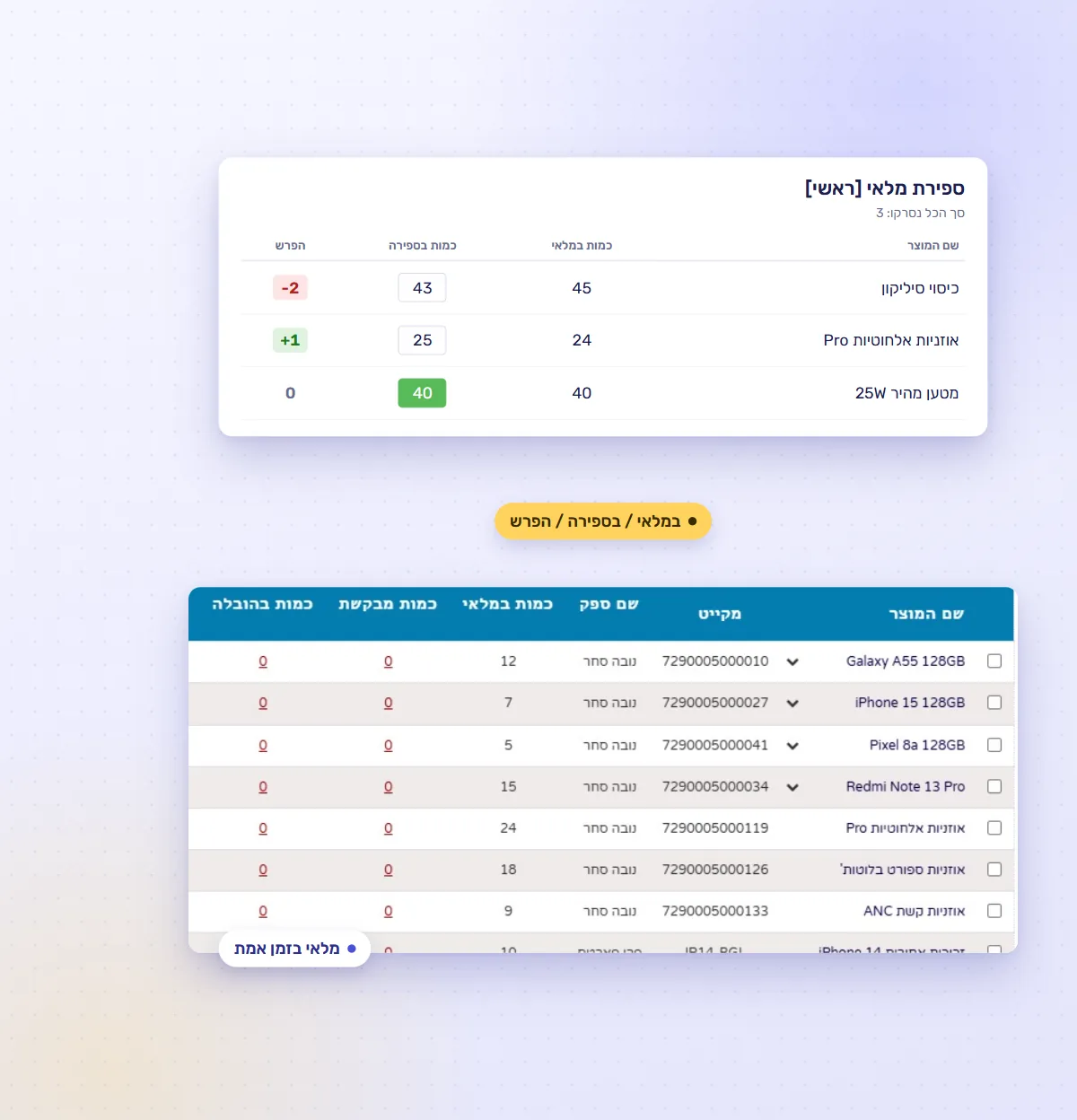
Stock changes with every sale, repair, goods receipt, return and exchange. Manual stock edits need a reason and stay in the product history.
An IMEI brings up the device's sales and repairs. At repair intake you see right away whether the phone was bought from you. IMEI barcodes can be printed.
IMEIs are entered at goods receipt or imported from Excel, and duplicates are rejected. Cost is recalculated as a weighted average, and selling prices can be updated on the spot.
Scan SKUs and IMEIs, and the system shows "in stock", "counted" and "difference" columns. A count can be paused and resumed, and the result exports to PDF and Excel.
Multiple warehouses are enabled on request. Other branches' stock is visible straight from the POS. In a transfer, IMEIs move together with the product.
חשבונית מס, קבלה, חשבונית מס/קבלה, תעודת משלוח, זיכוי. PDFs in Hebrew, Russian or English, sent by WhatsApp, SMS or email.
For tax invoices above the threshold, the POS requests the allocation number automatically when the document is created.
Open and close shifts with cash confirmation. Z report for any period, with a deletion log. Cash withdrawals only with a password and a reason.
Reports by product, customer and salesperson, with cost and margin. The salesperson report calculates commissions.
Any report daily, weekly or monthly, as PDF or Excel, by email, WhatsApp or SMS. For example, the Z report every evening.
Export to Rivhit and Hashavshevet, VAT payable, debtors and reports by payment method.
No deleting, importing or exporting. At the POS: no price changes, returns or stock edits, products are view-only.
Selling below the minimum price or cost needs a permission. The purchase price at the POS is shown only after a password.
Cash withdrawals, closing a repair without payment and showing purchase prices require a password.
POS action log, login history and change audit: you see who changed what.
Clock in and out by magnetic card or login, with a location check. Vacation, sick days and an hours report.
Sales report per salesperson with commission percentage and total.
Orders with IMEI and colour, PDF and email to the supplier. "Purchase planning" shows stock, sales for the period and how much to order. The supplier balance is on their card.
Bulk price changes by percentage or amount, with rounding. Separate price lists for dealers and wholesale customers.
About 2,000 models from 16 brands released since 2020 are added with one button from the public Google Play and Apple lists.
Upload supplier price lists as PDF or photos, the system finds the best price for each item, and a purchase order is created from the comparison. Add-on.
Answers customers 24/7, checks price and availability, sends a payment link and hands the chat to a salesperson. Add-on.
Products, prices and stock sync with WooCommerce and Shopify. A web order creates the customer and the document.
What a store with a repair lab has to do by hand in each option.
| Capability | Notebook and Excel | Basic POS | CRMOnline |
|---|---|---|---|
| IMEI linked to the sales receipt | by hand | partly | yes |
| Blocks selling the same IMEI twice | no | partly | yes |
| Repair ticket with passcode, pattern and accessories | on paper | no | yes |
| Repair status to the customer on WhatsApp | by phone | no | automatic |
| Parts written off stock per repair | no | no | yes |
| Repair paid at the same POS | separately | separately | yes |
| Allocation number for Israel Invoice | by hand | usually yes | automatic |
| Interface and messages in Hebrew and Russian | no | partly | yes |
The setup arrives ready: statuses, categories, repair services, messages, roles and dashboard. All that is left is your store's details.
Connect the store's number by QR code. Without it customers will not get repair status updates.
Add technicians and repair service prices. Add loaner phones with their IMEIs.
Import products and stock from Excel or enter them at goods receipt. The model catalogue updates with one button.
Check the logo, business details and payment terminal. Give salespeople the "Shop employee" role.
No hidden fees and no long-term contract. Free Zoom demo.
Very little. The "Phone store and repair lab" setup arrives ready: a phone-mode POS, 11 repair statuses, product categories, repair services, customer messages, roles and a dashboard. You connect WhatsApp, add technicians and repair prices, add loaner phones and check your business details and terminal.
With Pelecard, CardCom, AllPay and Grow (Meshulam); you choose one. An EMV terminal where the customer taps the card works with Pelecard and Grow: the POS sends the amount to the terminal, with regular, credit and instalment payments. With CardCom and AllPay you get payment links and online payments.
Yes. For tax invoices above the threshold, the allocation number (מספר הקצאה) is requested automatically when the document is created. All Israeli documents are issued from the POS: חשבונית מס, קבלה, חשבונית מס/קבלה, זיכוי.
Yes, as payment methods at the POS: the salesperson marks Bit or PayBox, and the amount goes on the receipt and into the payment-method report. There is no direct Bit integration. For remote payment there is a card payment link you can send on WhatsApp.
Yes. Multiple warehouses and branches are enabled on request. Each branch's stock is visible from the POS, transfers go through statuses (created, sent, received) and IMEIs move with the product. An employee can be limited to their own warehouses.
Hebrew or Russian, according to the customer's language. The store edits the wording. Messages are not sent during quiet hours.
Give them the ready-made "Shop employee" role: no price changes, returns or stock edits at the POS, and no deleting. Selling below the minimum price needs a permission, while cash withdrawals and closing a repair without payment need a password. Every POS action is logged.
Products, stock and IMEIs are imported from Excel, and a product import can be rolled back. Photos are uploaded in bulk. The phone model catalogue updates with one button: about 2,000 models from 16 brands since 2020.
No. CRMOnline runs in the browser on a computer or tablet, and the POS has an on-screen keyboard. A receipt printer and barcode scanner can be connected. It is a cloud system and needs an internet connection.
There is no trade-in buy-back of used phones and no warranty period tracking for phones you sold. You can sell items as "used" or "refurbished", handle warranty repairs through a service supplier and check by IMEI whether a phone was bought from you.
The POS, stock and repair lab are included in the Standard (₪195) and Premium (₪250) plans, price per user per month, before VAT. The AI bot and other AI features are add-ons. Annual billing costs less. Details on the pricing page: crmonline.co.il/en/pricing.
CRMOnline is developed by Gazit A.M., which has been implementing CRM systems for small and medium businesses in Israel for more than 20 years. More about the company, all CRMOnline solutions, for example warehouse management or invoicing and bookkeeping.
In a free Zoom demo we will walk through selling a phone with its IMEI, taking in a repair with passcode and pattern, the customer message and closing the Z shift.