

 עברית
 Русский
 English
The schedule lives in Excel or in your head
Double bookings and the daily "who is free on Thursday". In the CRM each cleaner has her own column, and the system won't book a busy cleaner or one on a day off.
CRMOnline with the "Cleaning company" setup runs every job from inquiry to payment. The manager drops the job into a cleaner's column, and the system sends her the address and map, reminds everyone, counts hours for payroll and prepares the client's invoice.
Five situations anyone who runs cleaners in Excel and WhatsApp knows, and what changes with CRMOnline.
Double bookings and the daily "who is free on Thursday". In the CRM each cleaner has her own column, and the system won't book a busy cleaner or one on a day off.
Job details with date, time, address, map and notes go out on WhatsApp automatically as soon as the job is booked.
The client forgot about the cleaning or nobody can open the door. 24 hours before, they get a reminder to arrange access: a key or an entry code.
Hours go into time tracking as soon as the job is marked done. The report shows hours and the amount due for every cleaner.
Leads from Facebook, TikTok, Google, your website and WhatsApp land in one pipeline. A lead from an ad form gets an instant WhatsApp reply.
Four steps. The manager books the job and marks it done; messages, reminders and hours entries follow ready-made automations.
A lead from Facebook, TikTok, Google, your website or WhatsApp enters the "New inquiry" stage. A lead from an ad form instantly gets "thanks, we'll be in touch soon" on WhatsApp in their language; at night the message waits until 08:00.
The manager clicks in a cleaner's column and picks the client and the service. The address comes from the client record, and the system checks shifts and overlaps. The lead moves to "Cleaning booked".
Every cleaner on the job gets the details on WhatsApp, plus a reminder with address and map 2 hours before. The client gets a confirmation and, 24 hours before, a request to arrange access.
The manager marks the job as done, and an hours entry is created for every cleaner. The client's invoice is issued from the job: service, hours and price are already filled in, and it goes to the client on WhatsApp.
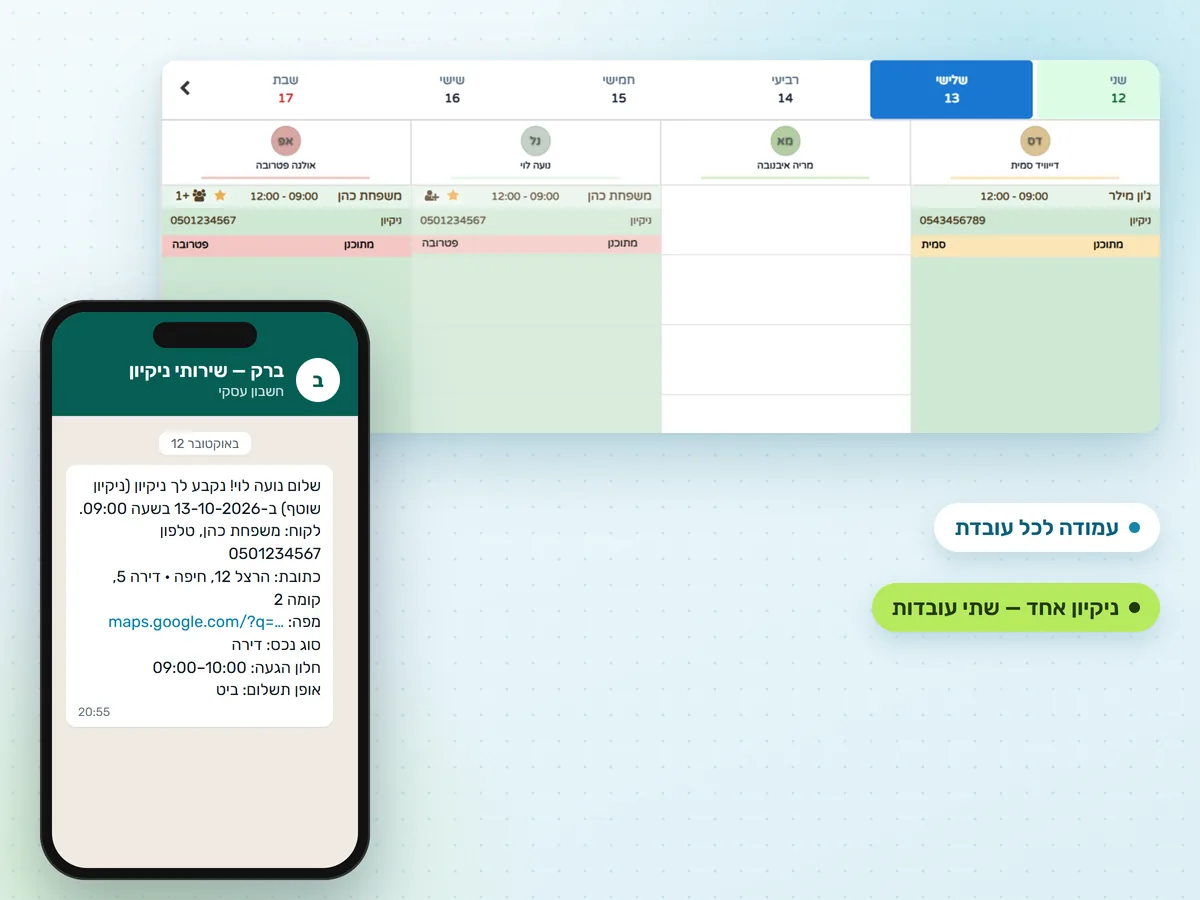
The "by worker" calendar shows the whole company day on one screen.
"By worker" view: each cleaner has her own column and each service its own colour. You see who is free without calls or spreadsheets.
Book two or three cleaners for a deep clean. Each sees the job in her column, gets the job details and counts as busy.
A cleaner cannot be booked on her day off. If a job runs past her shift, the system warns you. Overlaps are checked on save.
Non-working hours are grey and days off are pink. The week view shows each day's load as a percentage.
Weekly or bi-weekly cleanings are created as a series. When you cancel or move one, the system asks what to do with the client's future jobs.
When a job is marked done and the client has no next one, the system offers to book it.
A cleaner needs no app and no password. Everything arrives in her regular WhatsApp, in the language set in her record.
Date and time, service, client and phone, address and map link, property type, arrival window and payment method. Every cleaner on the job gets it: the lead cleaner and the invited ones.
Address and map once more, before she leaves. If the reminder falls at night, it arrives at 08:00, still before the job starts. Job moved: the reminder follows the new time. Job cancelled: no reminder.
In the evening, at a time you choose, all of tomorrow's jobs in one message: in order, with client phones, addresses and maps.
The message language comes from the cleaner's record. One cleaner gets the job in Hebrew, another on the same job in Russian.
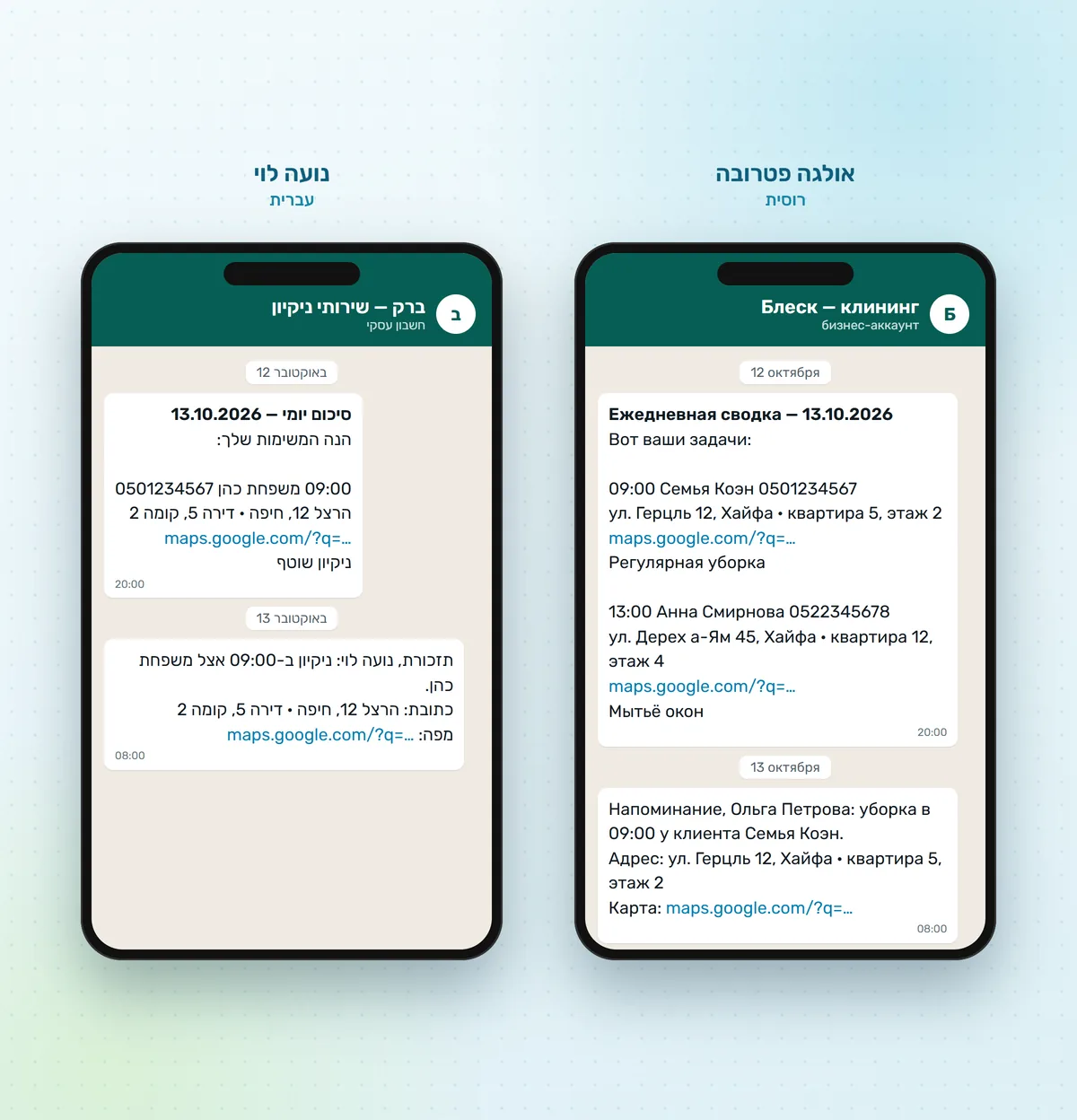
Client messages are sent by automations, in Hebrew or Russian.
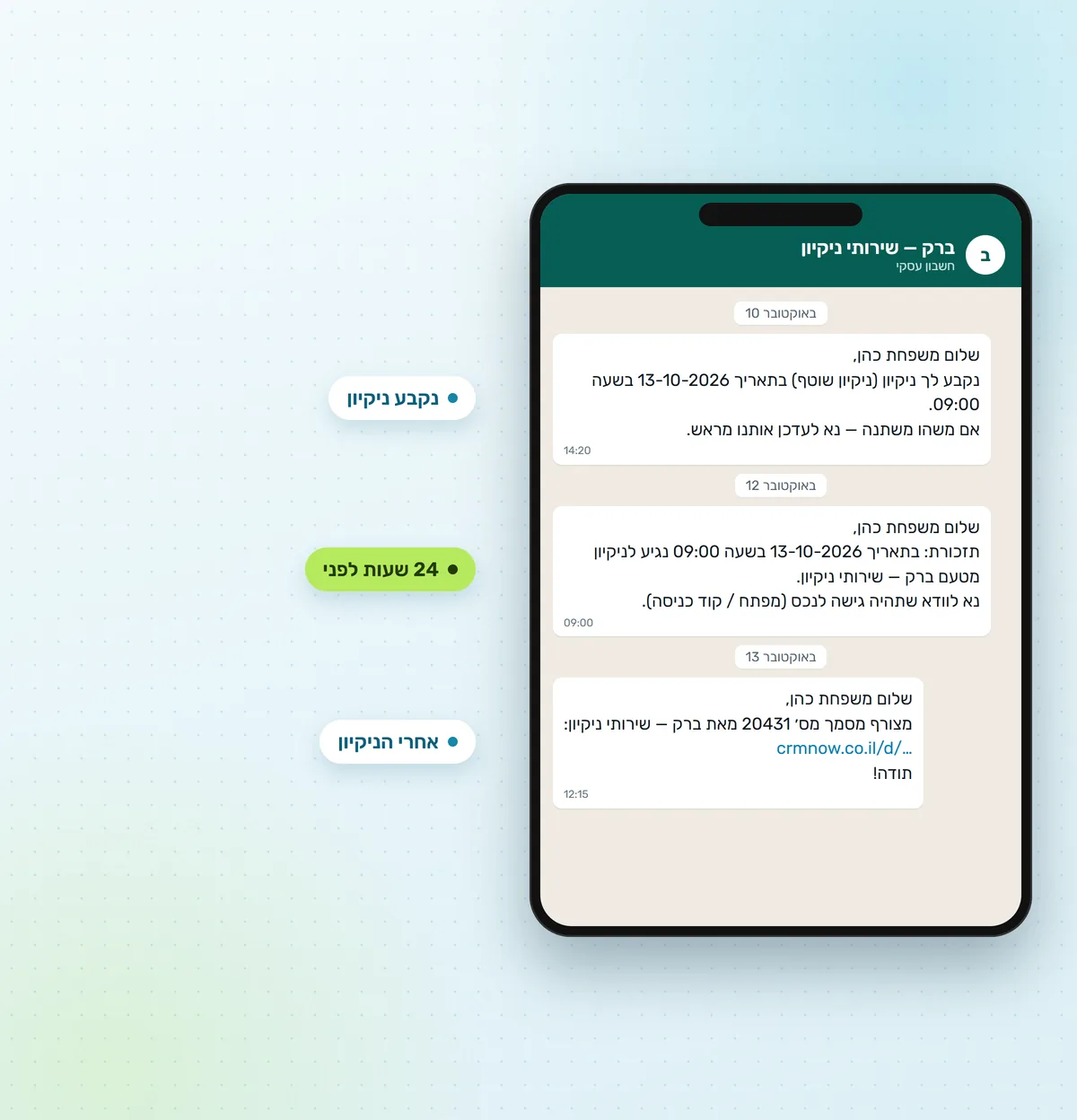
Every booking is confirmed by a WhatsApp message. 24 hours before, a reminder asks the client to arrange access: a key or an entry code. You can also send a link where the client confirms the visit and sees their cleanings.
When a job is cancelled, the client gets a message offering to pick a new time, and can reply right in that chat.
Frequency (from twice a week to "on request"), hourly price, status: active, inactive, moved to another company, do not contact, blacklist. A "do not assign" field lists cleaners who should not be sent to this client.
Property type (apartment, private house, office, stairwell), arrival window, payment method (cash, bank transfer, Bit, card, cheque). The address comes from the client record and can be changed for a different location.
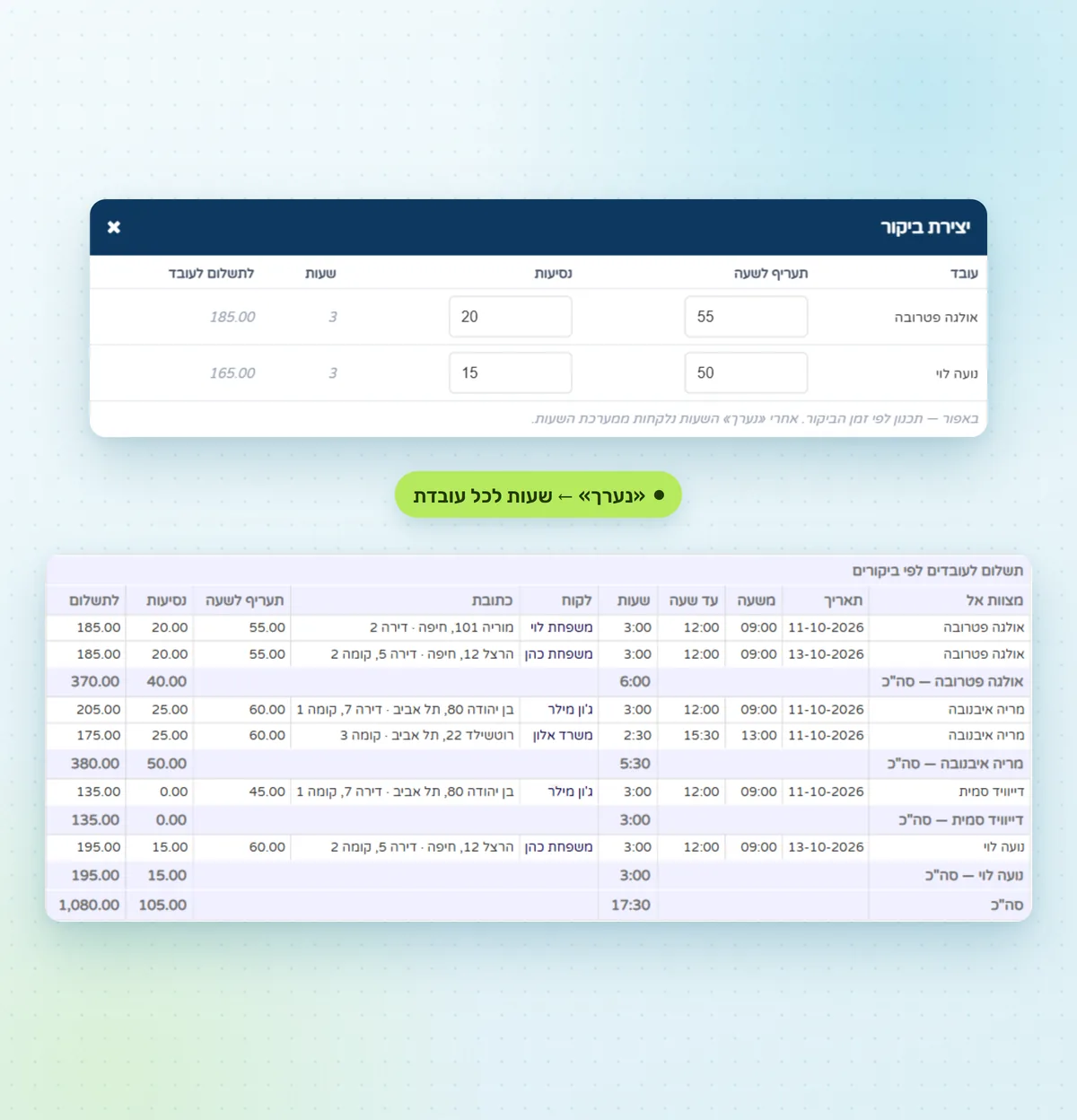
One job, two calculations: what the client pays and what each cleaner earns.
Hourly service rate × job hours: three hours at ₪118 is ₪354. A fixed price per job works too. The payment link calculates the amount the same way.
חשבונית מס, קבלה and חשבונית מס קבלה are issued from the job and sent to the client on WhatsApp. More about the invoicing and accounting module.
The job's Payment tab has a row for every cleaner: hourly rate and travel are filled in from her record. You can change the rate for this job only, for example for a deep clean.
Once a job is marked done, every cleaner gets an hours entry. The report shows hours and the amount due per cleaner for any period, and exports to Excel.
The "Cleaning company" setup includes eight automations, five services, a lead pipeline, a dashboard and a report. Automations are on from the start.
Two more run the pipeline: a new lead enters "New inquiry", and a lost lead moves to "Not relevant" with a reason: too expensive, timing doesn't work, chose another company, no answer, other.
Lead from an ad form
"Thanks, we'll be in touch soon" on WhatsApp in the lead's language. At night: at 08:00
Manager replied to the lead
The lead moves to "Clarifying"
Cleaning booked for a lead
The lead moves to "Cleaning booked"
Job created
Every cleaner on the job gets details with address, map and notes in her language
2 hours before the job
A reminder with address and map to every cleaner
Job cancelled
The client gets a message offering a new time
Duration goes into the calendar automatically. The company sets its own prices and durations.
| Regular cleaning | 3 h |
|---|---|
| Deep cleaning | 5 h |
| Post-renovation cleaning | 6 h |
| Office cleaning | 2 h |
| Window cleaning | 2 h |
Lead funnel, revenue by month, cleaner workload and this week's jobs on one screen.
The "Cleanings by cleaner and service" report: how many jobs of each type every cleaner did.
Interface in three languages. The client and every cleaner get messages in their own language.
iOS and Android app: calendar, client records, tasks and push notifications.
A Manager role for the office. Cleaners never log in: they get WhatsApp messages and their hours go into time tracking.
An AI receptionist that answers clients can be connected to the company's WhatsApp.
What a cleaning company has to do by hand with each option.
| Feature | Excel and WhatsApp | Generic CRM | CRMOnline |
|---|---|---|---|
| Calendar with a column for every cleaner | no | partly | yes |
| Several cleaners on one job | by hand | partly | yes |
| Shift, day-off and overlap checks | no | set up yourself | yes |
| Job details to the cleaner on WhatsApp with address and map | by hand | no | automatic |
| Reminders: cleaner 2 hours before, client 24 hours before | by hand | set up yourself | automatic |
| Client price: hourly rate × job hours | by hand | set up yourself | automatic |
| Hours and amount due for every cleaner | in a spreadsheet | no | automatic |
| Tax invoice / receipt to the client on WhatsApp | separately | separately | yes |
| Interface and messages in Hebrew and Russian | no | partly | yes |
The pipeline, services, automations and message templates are already in the "Cleaning company" setup. You only add your company details.
Connect the company number with a QR code. Job details, reminders and client messages go out through it.
Add cleaners: phone, calendar colour, hourly rate, travel and message language.
Fill in one week and copy it forward. A cleaner cannot be booked without a schedule.
Set service prices and upload your logo and business details for invoices.
No hidden fees and no long-term contract. Free demo on Zoom.
No. A cleaner never logs in and installs nothing. Job details with address and map, a reminder 2 hours before and a daily summary arrive in her regular WhatsApp, in Hebrew or Russian.
Yes. The job gets a lead cleaner and one or more invited cleaners. It appears in each cleaner's column, each gets her own job details and counts as busy for that time.
By the hours of completed jobs. When a job is marked done, an hours entry is created for every cleaner on it. Pay is her hourly rate plus travel. The time tracking report shows hours and the amount due for any period.
Either. With an hourly service the price is the hourly rate × job hours: three hours at ₪118 is ₪354. For a fixed price, simply leave hourly billing off.
The system won't save the job and tells you the cleaner isn't working that day or is already booked. If the job runs past her shift, for example in the evening, the system asks you to confirm.
A recurring cleaning is created as a series, for example weekly. When you cancel or move one, the system asks what to do with the client's future jobs. When a job is done and there is no next one, it offers to book it.
No. The system has no GPS tracking, routes or check-in links. A cleaner gets the address and map on WhatsApp, and paid hours are counted from the jobs the manager marks as done.
The interface is in Hebrew, Russian and English. Messages to clients and cleaners go out in Hebrew or Russian; each cleaner's language is set in her record.
The "Cleaning company" setup is included in the Standard (₪195) and Premium (₪250) plans, per user per month, before VAT. Annual billing costs less. Details on the pricing page: crmonline.co.il/en/pricing.
One day. Connect WhatsApp with a QR code, add cleaners with their rate and language, fill in the shift schedule and set service prices and business details for documents. The pipeline, services and automations are already configured.
CRMOnline is developed by Gazit A.M., which has been implementing CRM systems for small and medium businesses in Israel for more than 20 years. More about the company, all CRMOnline solutions, for example the calendar and booking or CRM for moving companies.
In a free Zoom demo we'll show how your cleaning job runs through CRMOnline: inquiry, calendar, job details for the cleaner, the client's invoice and the hours report.