

 עברית
 Русский
 English
Price disputes on moving day
The client signed a quote in advance that lists the items, addresses, floors, elevator and crane. Price and scope are agreed before the move.
CRMOnline with the "Moving company" setup runs a home or office move from start to finish. AI builds the item list from chat photos, the client signs the quote on their phone, the crew gets addresses and a map on WhatsApp, and movers' hours go into the timesheet.
Try it free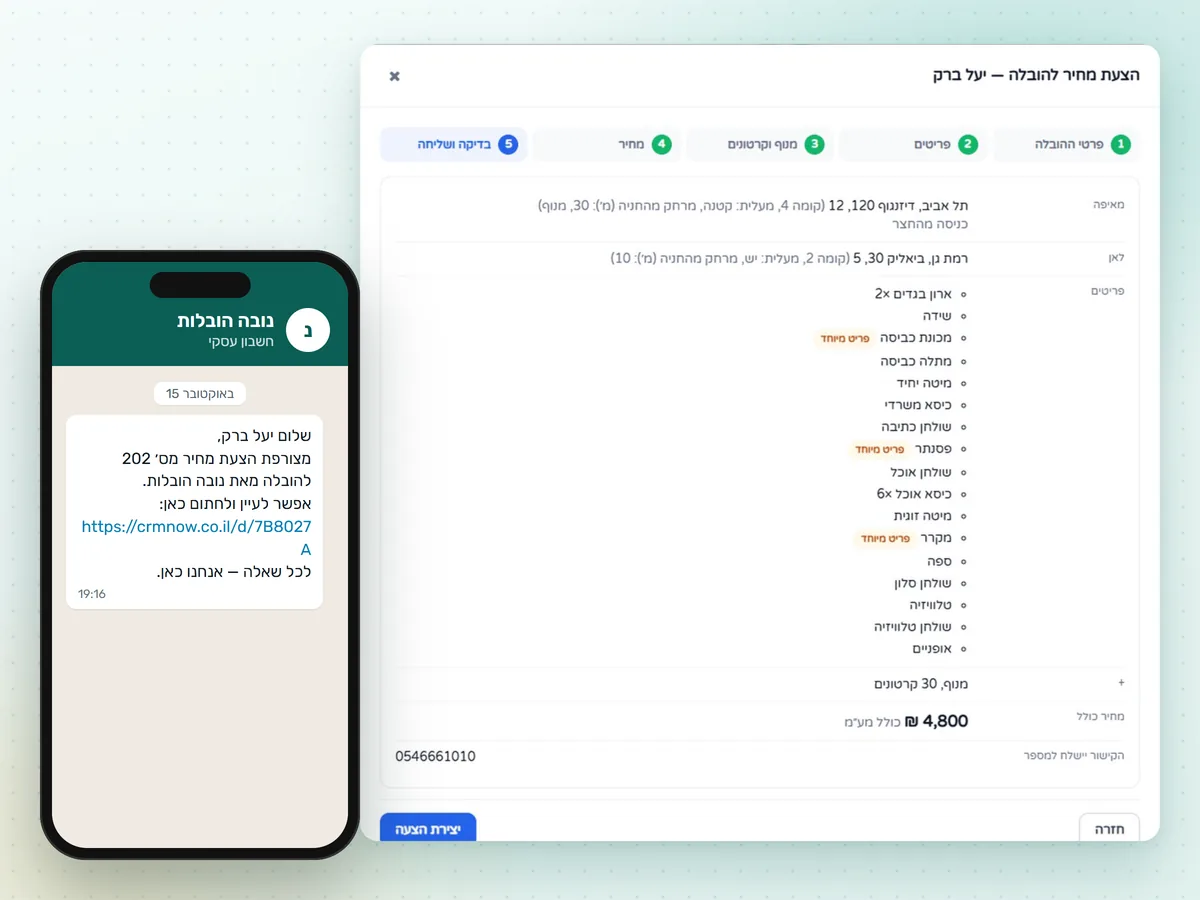
Five common reasons clients complain about movers, and what changes with CRMOnline.
The client signed a quote in advance that lists the items, addresses, floors, elevator and crane. Price and scope are agreed before the move.
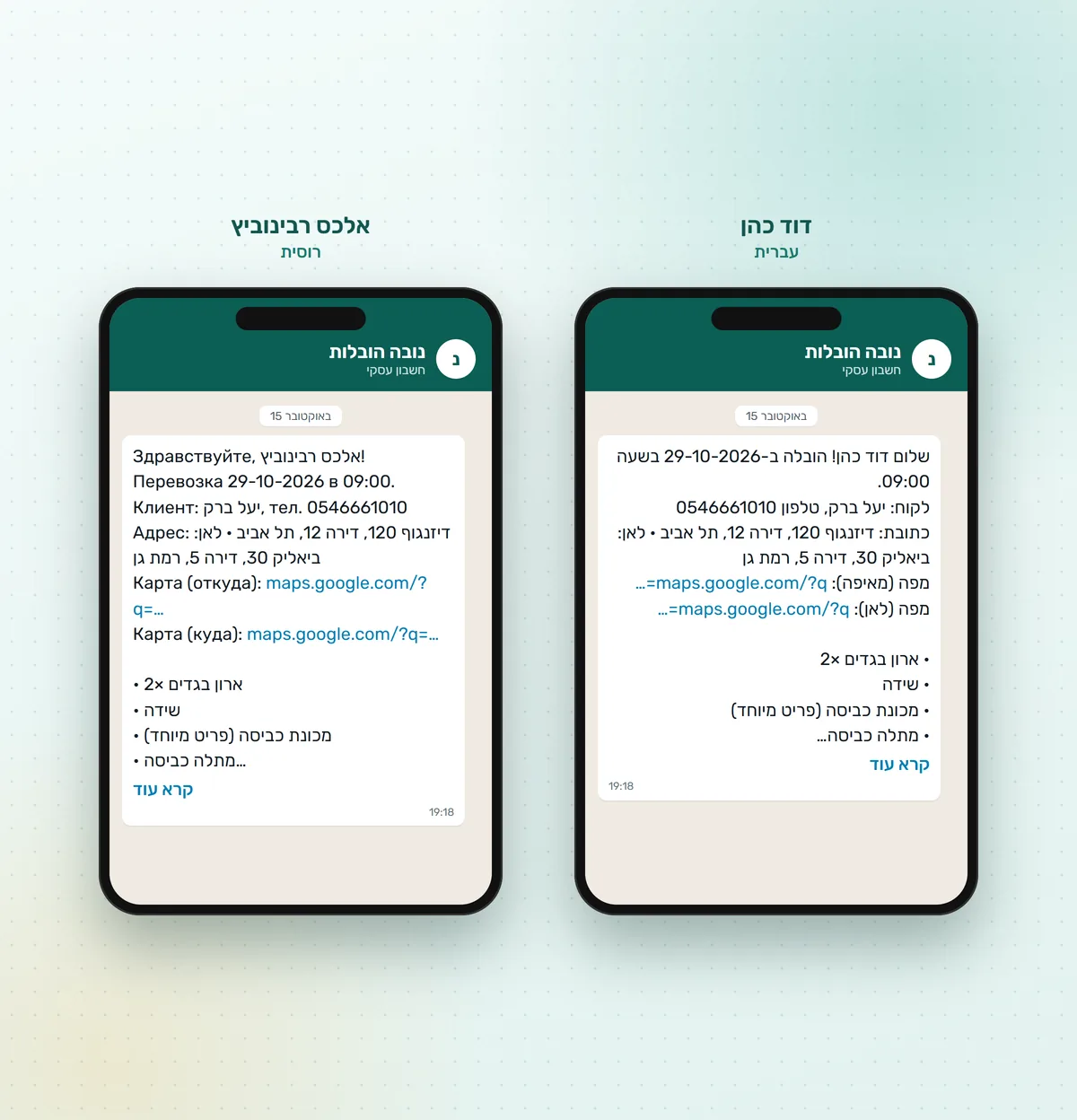
Movers get the same item list and access details on WhatsApp that the client signed.
Pianos, safes, glass and fridges are flagged as special items in both the quote and the crew message.
Inquiries from WhatsApp, Facebook, Google, Midrag and pro.co.il land in one pipeline. Unsigned quotes are not forgotten: reminders go out on a schedule.
The item list is built from chat photos, and crane and boxes come from your price list. You check it and set the price.
Eight steps. The manager prepares the quote, schedules the visit, marks the job as done and takes payment. The system handles the other steps.
A lead is created from WhatsApp, Facebook, Instagram, Google, Midrag, pro.co.il, a call, a referral or the API, and enters the "New inquiry" stage.
The manager replies on WhatsApp right from the record. When the client sends photos or video, the lead moves to "Clarifying".
A five-step wizard: addresses and access, items from photos with AI, crane and boxes, price with or without VAT, review.
The quote link goes to the client on WhatsApp. If it isn't signed, the client gets two reminders, and on day three the manager gets a task to call.
The client signs the quote on their phone. The lead becomes a client, an order is created from the quote, and the office is notified.
The "Visit" button in the order opens the calendar with the client, addresses and items. The manager picks the date, time and crew.
The client gets a confirmation and a reminder 24 hours ahead. Each mover gets the addresses, a map and the item list in their language.
Once the visit is marked done, each mover gets a timesheet entry. The next day the client is asked for a Google review.
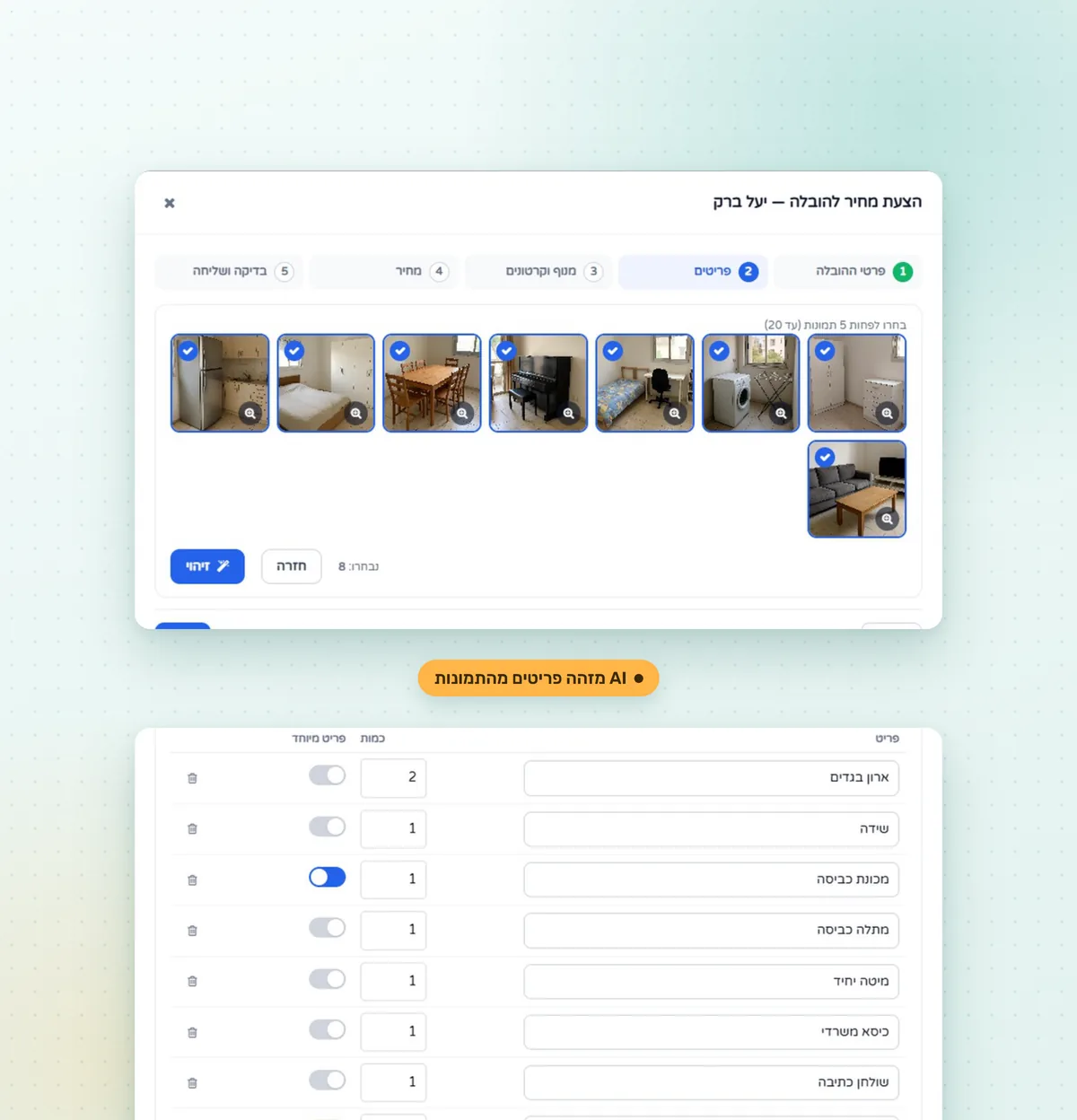
Five steps in one window. The wizard opens from the lead or client record.
Move type (home, office, single items), number of rooms, preferred date, who packs, whether disassembly and assembly are needed. Up to three pick-up and two drop-off addresses, each with floor, elevator (none, yes, small), distance from parking and a crane flag.
The manager selects at least five photos the client sent on WhatsApp, and AI returns a list with quantities. A wardrobe that shows up in two photos becomes one line. Pianos, safes, glass and fridges are marked as special items. The list can be edited and extended by hand.
Crane and boxes are switched on with a toggle; the price comes from your catalog and can be changed. The total is summed from the lines or entered as one amount, with or without VAT.
The quote has a single "Moving" line with the total price, the item list below it and "Includes: crane, 30 boxes". The PDF adds addresses and access details. You can reopen and recalculate, and a signed quote is view-only.
The "Moving company" setup includes eight automations. You import them from a ready file, add the office number and your review link, and switch them on.
Each automation opens on a visual canvas where you can change texts, delays and recipients. Messages go out in the client's language.
Quote created
The client gets a view-and-sign link on WhatsApp
Quote not signed
A reminder to the client, a second one the next day at 10:00, and a call task for the manager on day three
Client signed
The lead becomes a client without duplicates, an order is created, the office is notified
Visit scheduled
Confirmation to the client and a message to each mover with addresses, a map and the item list
One day before the move
A reminder to the client to arrange building access and truck parking
Visit done
A thank-you note and a Google review link
Movers don't need a CRM login: the job arrives on WhatsApp, and hours are counted from the visit.
The "Visit" button in the order opens the calendar with the client, the "Moving" service, addresses, items and access details already filled in. The manager chooses the date, time, person in charge and movers, and the system checks that each worker is free and works that day. The visit card has a "from / to" block with map links.
Date and time, client, pick-up and drop-off addresses, a map to both, the item list and access details. The mover gets all of it on WhatsApp, in Hebrew or Russian.
When the visit is marked done, a timesheet entry is created for each mover. Crew pay is hours × rate + travel, with a separate rate for each mover. The hours and pay report exports to Excel.
Invoice or receipt under Israeli tax rules, with an allocation number. Cash, transfer, Bit, credit card, up to 36 installments, several methods in one receipt, from a computer or the mobile app. The document is sent to the client on WhatsApp. More about the invoicing and bookkeeping module.
The "Moving company" setup is chosen when the system is installed. Pipeline, services, message templates, automations, dashboard, report and roles are set up for moving.
Lead pipeline, quotes sent and signed by month, revenue and this week's moves. The "Quote conversion" report shows each manager's results.
The interface is available in three languages. The client and every mover get messages in their own language.
Bit, credit cards, up to 36 installments. Tax invoices and receipts with an allocation number, Israeli work calendar and holidays.
iOS and Android app: records, calendar, tasks, push notifications and payments.
Separate roles for the owner, managers and movers. Movers never log in: they get WhatsApp messages, and their hours go into the timesheet.
Which parts of a move you have to handle by hand in each option.
| Feature | WhatsApp + spreadsheet | Generic CRM | CRMOnline |
|---|---|---|---|
| All leads in one pipeline, including Midrag and pro.co.il | no | partly | yes |
| Item list from chat photos (AI) | no | no | yes |
| Quote with addresses, floors, elevator and crane | manual | needs setup | yes |
| Client e-signature on the phone | no | partly | yes |
| Reminders for unsigned quotes | manual | needs setup | automatic |
| After signing: client and order | manual | manual | automatic |
| Addresses, map and items to the crew on WhatsApp | manual | no | automatic |
| Timesheets and crew pay | in a spreadsheet | no | automatic |
| Israeli tax invoice / receipt, Bit, installments | separately | separately | yes |
| Interface and messages in Hebrew and Russian | no | partly | yes |
The pipeline, automations, message templates and reports are already in the setup. You only add your company details.
Choose "Moving company" when the system is installed. Modules, pipeline, services and templates are configured right away.
Connect your business number with a QR code or through the Facebook API.
Set crane and box prices, and add movers with an hourly rate and travel pay.
Enter the office number for notifications and your Google review link, then switch the automations on.
No hidden fees and no long-term contract. Free trial, no credit card needed.
The "Moving company" setup is included in the Standard (₪195) and Premium (₪250) plans. Prices are per user per month, before VAT. Movers don't need a login, so you don't pay for them. Yearly billing costs less, and the trial is free.
No. The "Moving company" setup is built for moving homes, offices and single items: one vehicle per job, a crew of movers and a quote based on an item list. Routes, fleet management and GPS tracking are not part of the system.
In the quote wizard, the manager selects at least five photos the client sent on WhatsApp. AI recognizes furniture and appliances, merges an item seen in several photos into one line and flags special items: pianos, safes, glass, fridges. The list can be edited and extended by hand.
Yes. Leads from Midrag and pro.co.il, as well as from WhatsApp, Facebook, Instagram, Google, phone calls and the API, land in one CRM pipeline at the "New inquiry" stage.
The client signs the quote on their phone. It lists the items, addresses, floors, elevator, crane and total price, so the scope of work is agreed before the move and there are fewer price disputes on moving day. A signed quote cannot be changed, only viewed.
No. Each mover gets the date, time, addresses, map and item list on WhatsApp in their language. Their hours go into the timesheet when the manager marks the visit as done.
Yes. Payment is taken from the order: cash, bank transfer, Bit, credit card, up to 36 installments, several methods in one receipt. The document follows Israeli tax rules and is sent to the client on WhatsApp.
The interface is in Hebrew, Russian and English. Message templates for clients and crews exist in Hebrew and Russian, and the system picks the recipient's language.
CRMOnline is developed by Gazit A.M., which has been implementing CRM systems for small and mid-sized businesses in Israel for more than 20 years. More about the company, all CRMOnline solutions, for example client and lead management or CRM for beauty salons.
In a free Zoom demo we'll show how your move goes through CRMOnline: inquiry, quote, signature, crew, payment and review.