

 עברית
 Русский
 English
Delivery note, tax invoice and receipt
The order produces a תעודת משלוח, חשבונית מס and קבלה that follow Israeli rules. Documents stay linked to the order and the customer. More about the invoicing and accounting module.
CRMOnline takes a sale from quote to payment. Orders, delivery notes and invoices are issued from the customer card, customers pay by card via Pelecard or Allpay or through a WhatsApp link, and stock levels update with every sale.
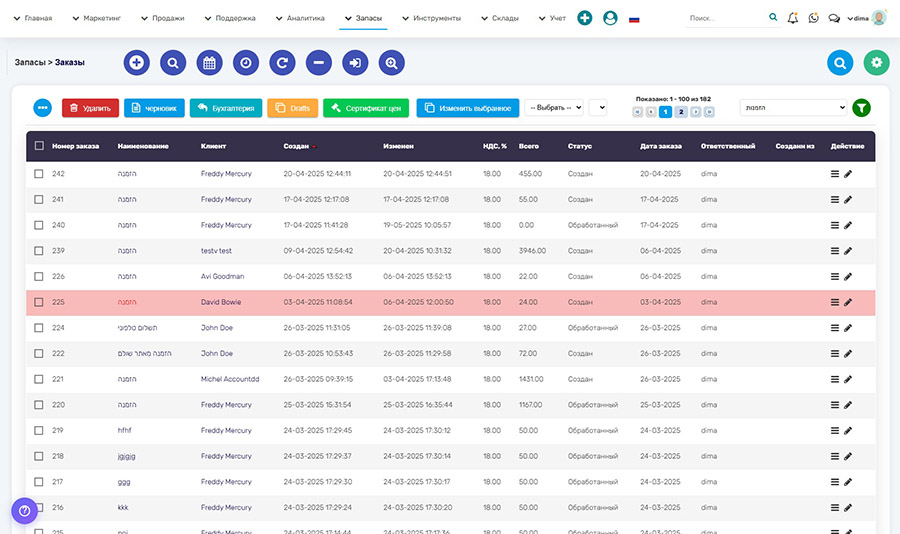
Four steps. Each document is created from the previous one, so customer details and products are entered once.
A customer calls. You open their card, pick products and quantities, and the quote goes to them by email or WhatsApp.
The customer approves, and one click turns the quote into an order. Prices come from the price list assigned to the customer or their group.
The order produces a delivery note and an invoice that follow Israeli rules. Every document is linked to the order and appears in the customer history.
The customer pays by card inside the system or through a link on WhatsApp or SMS. The payment shows on the order and the goods come off stock.
Orders, delivery notes and invoices are linked, so customer details and products are entered once.
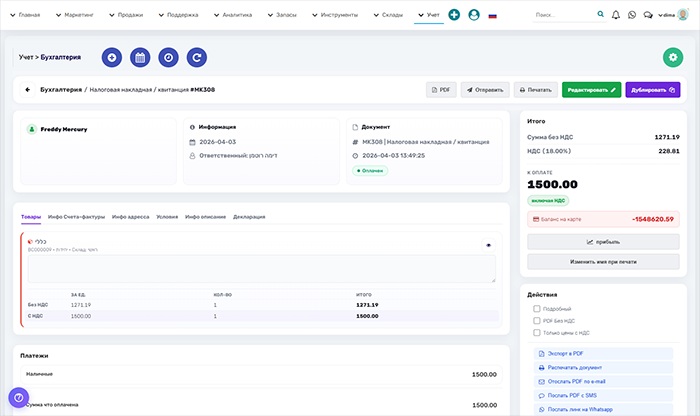
The order produces a תעודת משלוח, חשבונית מס and קבלה that follow Israeli rules. Documents stay linked to the order and the customer. More about the invoicing and accounting module.
The document PDF goes to the customer by email or WhatsApp straight from the card.
Wholesale price, retail price or a personal discount: a price list is assigned to a customer or group and fills in the order automatically.
The customer card shows all of their quotes, orders and documents.
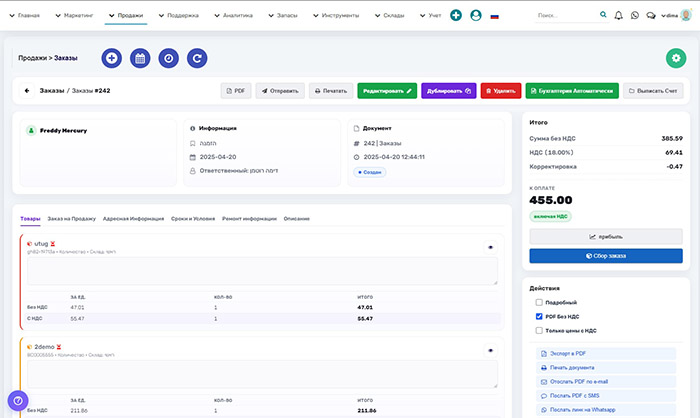
The money shows on the order right away, and the order can go on a courier route.
Accept card payments inside the system. The amount shows on the order right away.
The customer gets a link and pays from their phone, with no terminal and no cash.
Installment payments, subscriptions with automatic charges and MASAV direct debit integration.
Orders are split between couriers, each delivery has a status, and the customer gets a WhatsApp or SMS update when the goods are on the way.
Nine areas that work with the same customers, products and orders.
| Area | What it does |
|---|---|
| Documents | Quote, order, delivery note, tax invoice and receipt that follow Israeli rules. Sent by email or WhatsApp. |
| Payments | Cards via Pelecard and Allpay, payment links on WhatsApp or SMS, installments, subscriptions with automatic charges, MASAV. |
| Inventory | Real-time stock, multiple warehouses, transfers and goods-movement history. More about inventory management software. |
| Purchasing and suppliers | Purchase orders, supplier returns, supplier cards with full history. |
| Price lists | Several price lists: wholesale, retail, personal discount. A price list is assigned to a customer or group and fills in the order. |
| Retail POS | Pick products, take cash, card or a payment link, print a receipt. Stock updates with every sale. |
| Field sales | A field rep opens CRMOnline on a smartphone, shows the catalog, places the order and takes a card payment at the customer. |
| Deliveries | Delivery routes, courier assignment, delivery status, WhatsApp or SMS update to the customer. |
| Reports | Sales by period, rep, product and customer. Export to Excel and PDF, and to Rivhit and Hashavshevet for your accountant. |
The module is built for businesses that sell products or services and issue Israeli tax documents.
Monthly subscription with no commitment: cancel any time. The Zoom demo is free.
Yes. Tax invoices, receipts and delivery notes (חשבונית מס, קבלה, תעודת משלוח) are issued from the customer card or the order, following Israeli rules, and sent to the customer by email or WhatsApp. For your accountant, the Reports module exports to Rivhit and Hashavshevet.
CRMOnline connects to Pelecard and Allpay. Take a card payment inside the system, or send the customer a payment link on WhatsApp or SMS and they pay from their phone. The payment shows on the order right away.
Yes. Stock updates with every sale and every delivery from a supplier, so you see what is running low and what to reorder. You can run several warehouses and move goods between them. More on the inventory management page.
Yes. Create several price lists, for example wholesale and retail, and assign each one to a customer or group. When you create an order, the right price list is applied automatically.
Yes. A field rep opens CRMOnline in a smartphone browser, shows the customer the product catalog, places the order on the spot and takes a card payment. The order appears in the office right away.
Yes. In the POS module you pick products, take cash, card or a payment link and print a receipt. Stock updates with every sale. POS is included in Standard and Premium.
Yes. Sales by period, rep, product and customer: you see which products sell best and where sales dropped. Reports export to Excel and PDF.
No. CRMOnline runs in the browser on a computer, tablet or smartphone, and the data is stored in the cloud. The interface is in Hebrew, Russian and English.
From ₪160 per user per month, before VAT (Basic plan). Inventory and POS are included in Standard (₪195) and Premium (₪250). The subscription is monthly, and annual billing costs less. Details on the pricing page.
No. The subscription is monthly with no commitment, so you can cancel any time. Instead of a trial, our team migrates your data and sets up the system for free, and there are video tutorials on working in CRMOnline.
CRMOnline is developed by Gazit A.M., which has been implementing CRM systems for small and medium businesses in Israel for more than 20 years. More about the company, pricing, all CRMOnline solutions, for example invoicing and accounting or inventory management.
On a Zoom demo we will run a sale through CRMOnline: quote, order, invoice, payment link and stock write-off. The demo is free and takes 20–30 minutes.